Game of Life looks simple, but rendering millions of cells in real time inside a browser is not. This post is based on my seminar talk “Efficient rendering in HTML Canvas for cellular automaton simulations” and walks through several CPU and GPU techniques, comparing their trade‑offs and performance.
TL;DR: Separating computation from rendering, avoiding unnecessary drawing, and moving work to multiple threads or the GPU are key to smooth large‑grid simulations.
Motivation and problem
My thesis project Fuzzy Life extends Conway’s Game of Life with fuzzy cell values, which immediately amplifies both computation and rendering costs. When simulating grids with hundreds of thousands or millions of cells, the bottleneck is no longer just the rules – it is how often and how efficiently the world is drawn.
Typical pain points:
- Computation: Updating neighbors and applying rules for every cell each step.
- Rendering: Number of calls into the graphics API, buffer transfers, overdraw, and drawing off‑screen.
- Interaction: Smooth pan/zoom, high‑DPI displays, and large viewports.
The goal is to find rendering architectures that:
- Decouple simulation step from drawing.
- Update only visible or changed regions.
- Scale from basic Canvas 2D up to GPU WebGL2.
Canvas 2D basics
HTML <canvas> provides a bitmap surface that JavaScript can draw into with a 2D rendering context.
- Each canvas has a 2D context with functions like
clearRect,fillRect,drawImage,stroke, orfillText. - Canvas is immediate mode: once something is drawn, the API does not track objects; if state changes, everything must be drawn again.
- Canvas 2D is widely used for visualizations, games, simulations, and image processing where direct pixel access is helpful.
For Game of Life this means the naive approach is to loop over all cells and call fillRect for each live cell on every frame.
Demo environment and server
All demos are small HTML files that share a common JavaScript core and differ in how they compute and draw frames.
The demos are served through a minimal Express server with the necessary COOP/COEP headers:
// server.js
app.use((req, res, next) => {
res.setHeader('Cross-Origin-Opener-Policy', 'same-origin');
res.setHeader('Cross-Origin-Embedder-Policy', 'require-corp');
next();
});

app.use(express.static(__dirname));

app.get('/', (req, res) => {
res.sendFile('index1-full-redrawn.html', { root: __dirname });
});
Launch with:
npm init -y
npm i express
node server.js

# open http://localhost:8080/
Available demo pages:
index1-full-redrawn.html– full redraw baseline.index2-dirty-rectangles.html– dirty rectangles.index3-vis-region-rendering.html– visible region rendering.index4-static-web-workers.html– single web worker.index5-static-web-workers-n.html– multi‑worker with copying.index6-sharedarray-multiworker.html– SharedArrayBuffer multi‑worker.index7-static-image-data.html– ImageData push rendering.index8-sharedarray-multiworker-imagedata.html– SAB + ImageData hybrid.index9-gpu-webgl.html– WebGL2 GPU version.
CPU rendering: three basic strategies
Full redraw every frame
The simplest model is to redraw the entire world every step, ignoring camera or visibility.
Idea
- For every simulation step:
- Clear background.
- Loop through all
ROWS * COLScells. - For each live cell, draw a 1×1 rectangle at its coordinates.
function drawAll(ctx) {
    ctx.fillStyle = '\#fff';
    ctx.fillRect(camX, camY, visW, visH);

    ctx.fillStyle = '\#000';
    // Full redraw of every cell
    for (let y = 0; y < ROWS; y++) {
        const off = y * COLS;
        for (let x = 0; x < COLS; x++) {
            if (filled[off + x]) {
                ctx.fillRect(x, y, 1, 1);
            }
        }
    }
}
Pros
- Conceptually simple and reliable baseline for measuring performance.
- Good stress‑test for CPU and Canvas API.
Cons
- Extremely many
fillRectcalls, including off‑screen cells. - Cost grows with world size, not viewport size, which kills performance for large grids (∼100–300 ms per step in the tests).
Dirty rectangles
Dirty rectangles track which cells changed between frames and redraw just those cells over the old frame.
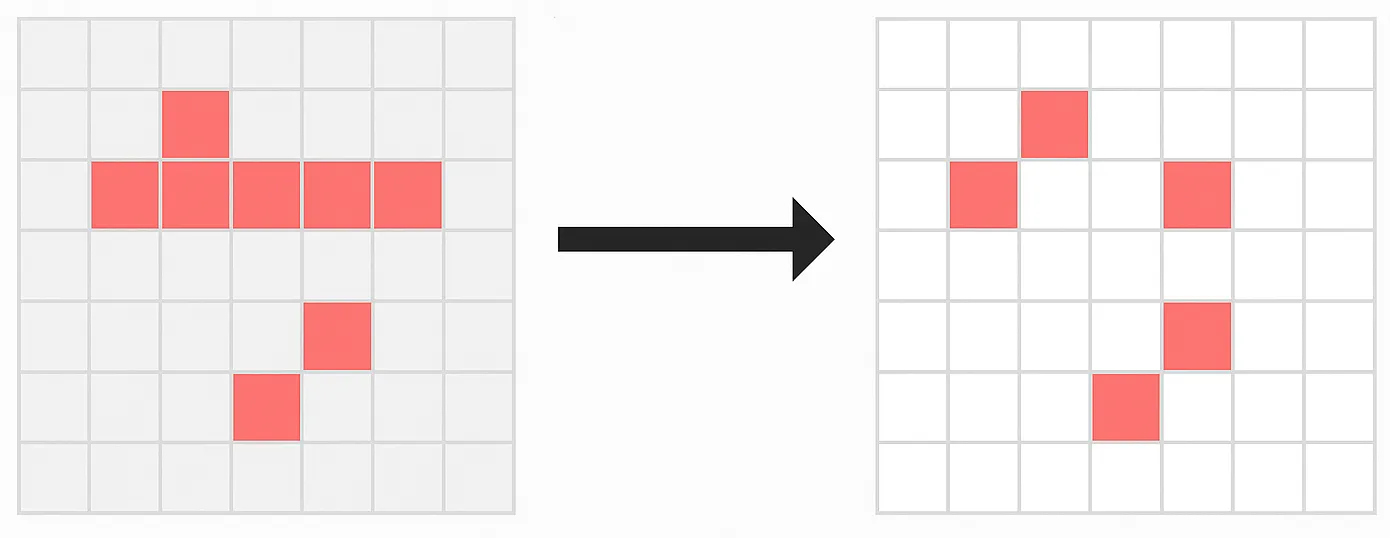
Idea
- Keep two arrays:
filled(current) andnext(next generation). - After computing the next state, compare both arrays.
- Only for indices where
filled[i] !== next[i]:- Pick the correct color (alive/dead).
- Draw a 1×1 rectangle at that cell.
function drawDirtyGlobal() {
    for (let y = 0; y < ROWS; y++) {
        const off = y * COLS;
        for (let x = 0; x < COLS; x++) {
            const i = off + x;
            if (filled[i] !== next[i]) {
                ctx.fillStyle = next[i] ? '\#000' : '\#fff';
                ctx.fillRect(x, y, 1, 1);
            }
        }
    }
}
Characteristics
- First frame still needs a full redraw; subsequent frames update only changed cells.
- Time per frame becomes proportional to number of modified cells, not total cells.
- Consistent work independent of viewport size, but updates still occur for off‑screen areas.
Visible region rendering
Visible region rendering clips the world to what the camera sees and draws only the currently visible part.
Idea
- Compute the world‑space rectangle corresponding to the viewport, based on camera position and zoom.
- Clamp this rectangle to world bounds.
- Loop only through cells inside this region and draw live ones.
const W = canvas.width,
      H = canvas.height;
const left = camX,
      top = camY;
const right = camX + W * S;
const bottom = camY + H * S;

const cs = Math.max(0, Math.floor(left / CELL));
const ce = Math.min(COLS - 1, Math.ceil(right / CELL));
const rs = Math.max(0, Math.floor(top / CELL));
const re = Math.min(ROWS - 1, Math.ceil(bottom / CELL));

ctx.save();
ctx.scale(S, S);
ctx.translate(-camX, -camY);

ctx.fillStyle = '\#fff';
ctx.fillRect(left, top, right - left, bottom - top);

ctx.fillStyle = '\#000';
for (let y = rs; y <= re; y++) {
    const off = y * COLS;
    for (let x = cs; x <= ce; x++) {
        if (filled[off + x]) {
            ctx.fillRect(x, y, 1, 1);
        }
    }
}
ctx.restore();
Why it matters
- Reduces overdraw and memory access by skipping cells outside the viewport.
- Most beneficial when zoomed in so the viewport covers only a fraction of the world.
- Essential building block for later optimizations (ImageData, SAB, GPU), which all rely on a defined visible region.
Parallelization on the CPU
Single Web Worker
Game of Life’s neighbor updates are local and parallelizable, so moving the simulation step to a Web Worker keeps the UI thread responsive.
Architecture
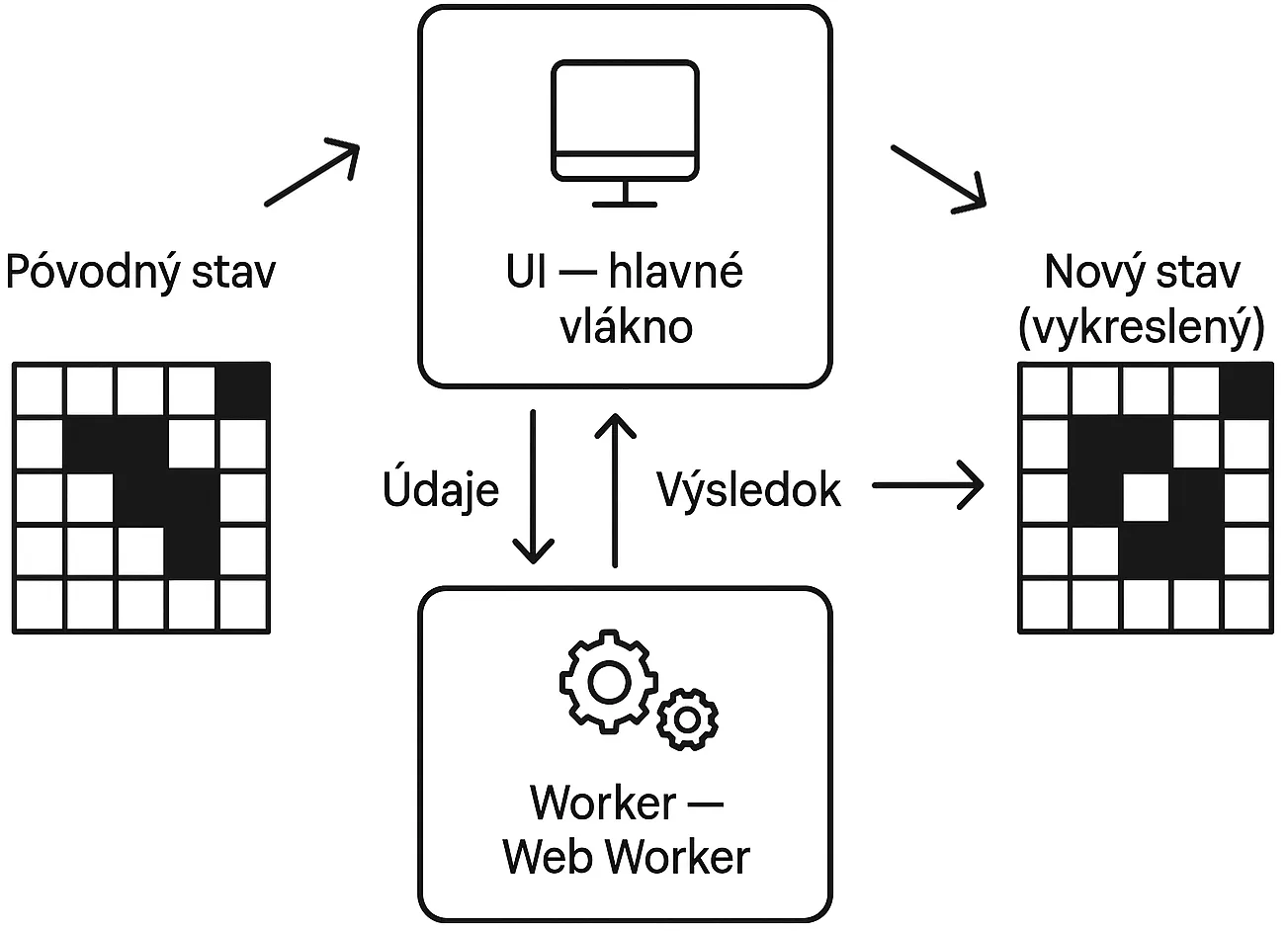
Main thread:
const worker = new Worker('worker.js');
worker.postMessage({
    init: true,
    COLS,
    ROWS
});

worker.onmessage = (e) => {
    const filled = new Uint8Array(e.data.buffer); // received world state
    draw(filled); // UI thread only draws
};
Worker:
onmessage = (e) => {
    if (e.data.init) {
        initWorld(e.data.COLS, e.data.ROWS);
        return;
    }

    // Compute next generation
    for (let y = 0; y < ROWS; y++) {
        for (let x = 0; x < COLS; x++) {
            const i = y * COLS + x;
            next[i] = rule(filled, x, y);
        }
    }

    // Swap buffers and transfer
    [filled, next] = [next, filled];
    postMessage({
        buffer: filled.buffer
    }, [filled.buffer]);
};
Pros
- Simulation continues even if UI temporarily spikes; panning and zooming feel smooth.
- Transferring
ArrayBufferas transferable avoids extra copies on send.
Cons
- With a 2000×2000 grid, one step takes about 400 ms, making the worker computation itself the bottleneck.
- Only one CPU core is fully used.
Multi‑worker with copying
To leverage multiple cores, the world can be split into horizontal strips, each handled by its own worker.
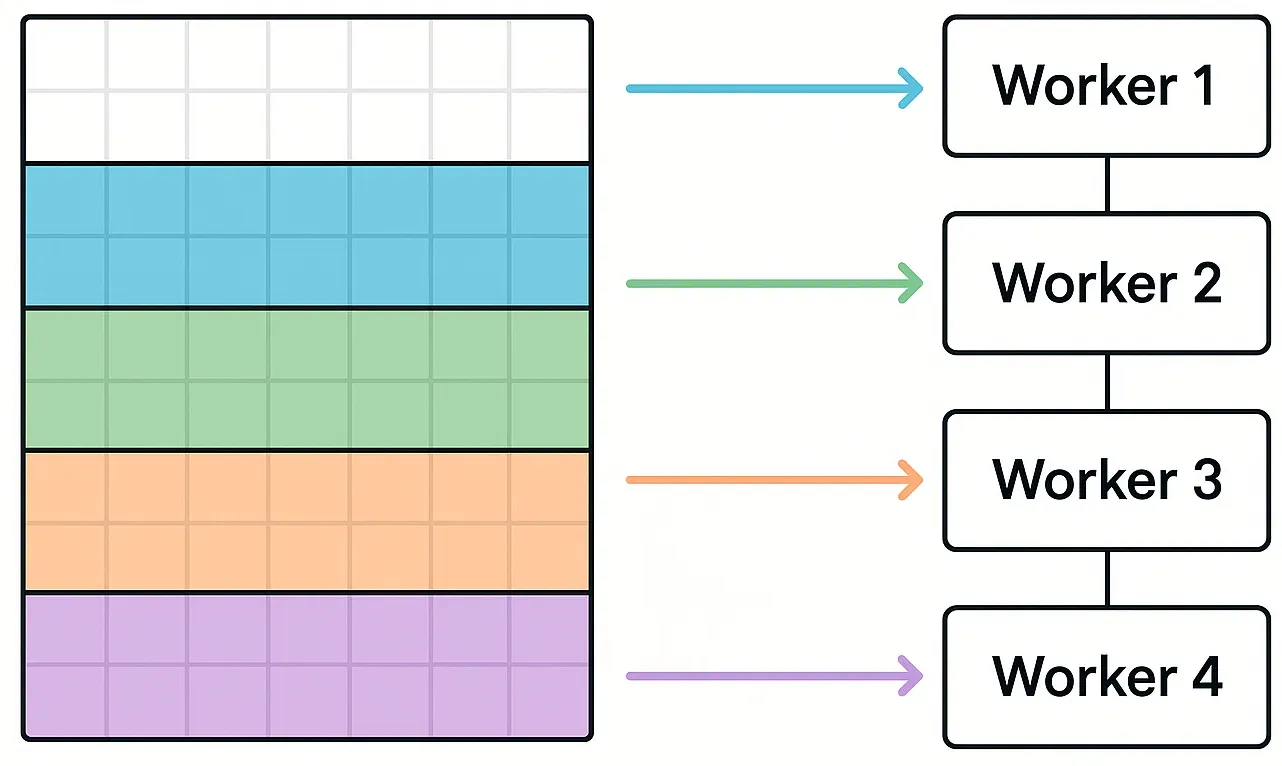
However:
- Each worker receives a copy of the world portion (about 4 MB per slice for 2000×2000).
- The main thread also copies buffers (e.g.
filled.buffer.slice(...)) per step. - Sending 16–44 MB of data via
postMessageeach frame costs hundreds of milliseconds.
Result:
- The computation is parallel, but data transfer overhead dominates; measured times are ≈1000 ms per step, which is slower than the single‑worker version.
This motivates removing data copies entirely.
SharedArrayBuffer: zero‑copy
Concept
SharedArrayBuffer allows several workers and the main thread to share the same underlying memory. No copies, no transfer list, just shared typed arrays with proper synchronization when needed.
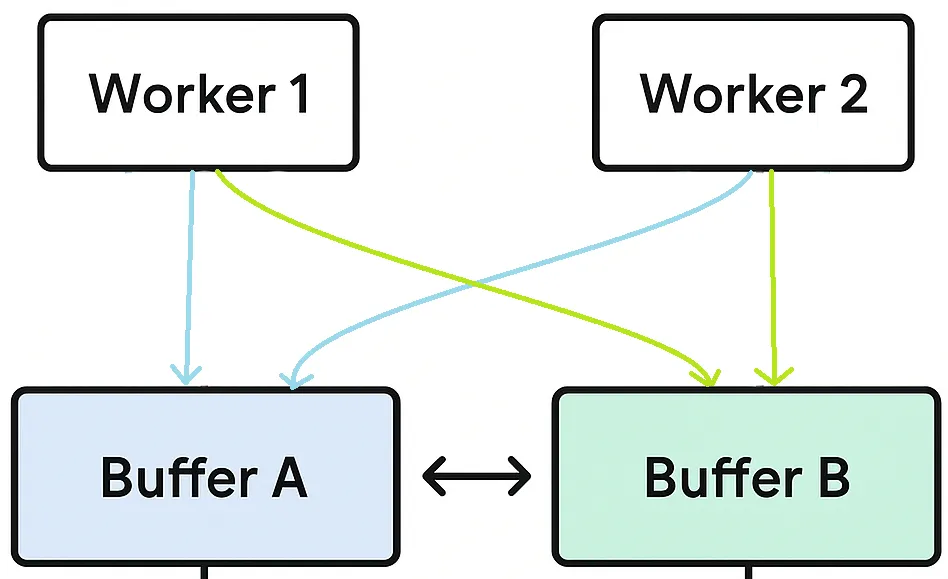
Initialization
Main thread:
const sabA = new SharedArrayBuffer(COLS * ROWS);
const sabB = new SharedArrayBuffer(COLS * ROWS);

const worldA = new Uint8Array(sabA);
const worldB = new Uint8Array(sabB);

// spawn workers and send SABs
for (const worker of workers) {
    worker.postMessage({
        init: true,
        COLS,
        ROWS,
        sabA,
        sabB
    });
}
Workers use new Uint8Array(sabA) and new Uint8Array(sabB) to read from one buffer and write the next generation into the other.
Pattern
- All workers read from buffer A and write into buffer B.
- After each step, the main thread simply swaps references:
current = B; next = A(ping‑pong). - No
postMessagedata payloads are necessary; messages only signal “step done”.
Performance
- Critical path becomes the slowest worker, which sets the global step time.
- In measurements, SharedArrayBuffer multi‑worker reduced step time from ≈1000 ms to about 80–120 ms for 2000×2000.
Requirements
To use SharedArrayBuffer in the browser, the page must be cross‑origin isolated, e.g. via:
Cross-Origin-Opener-Policy: same-originCross-Origin-Embedder-Policy: require-corp
ImageData push rendering
One big putImageData
Instead of calling fillRect thousands of times, ImageData rendering builds a pixel buffer in memory and sends it to the canvas in a single call.
Idea
- Use
ctx.createImageData(W, H)to get anImageDataobject for the viewport size. - Fill its
Uint8ClampedArraywith grayscale or RGB values based on cell state and zoom. - Call
ctx.putImageData(img, 0, 0)once per frame.
const img  = ctx.createImageData(W, H);
const data = img.data;

for (let py = 0; py < H; py++) {
const wy = top + Math.floor(py * S);
if (wy >= bottom) break;

for (let px = 0; px < W; px++) {
const wx = left + Math.floor(px * S);
if (wx >= right) break;

    const alive = filled[wy * COLS + wx];
    const c = alive ? 0 : 255;

    const i = (py * W + px) * 4;
    data[i]     = c; // R
    data[i + 1] = c; // G
    data[i + 2] = c; // B
    data[i + 3] = 255; // A
    }
}

ctx.putImageData(img, 0, 0);
Pros
- Minimizes calls from JS into the native graphics layer – only one per frame.
- Performs very well for large zoom levels where each cell covers multiple pixels and the viewport is large.
Cons
- Copying a large
ImageDatablock from JS to the native context still costs several milliseconds. - Not ideal for small incremental changes, because the whole buffer is always transferred.
SharedArrayBuffer and ImageData
The hybrid approach uses:
- SharedArrayBuffer for parallel simulation across multiple workers without copying.
- ImageData for efficient full‑viewport rendering in a single push.
This combines:
- Parallel computation.
- Zero‑copy world state sharing.
- Minimal number of draw calls.
In practice:
- Typical times for a 2000×2000 grid were 40–70 ms per step (computation + rendering), making it the fastest CPU‑only variant in the tests.
GPU WebGL2 implementation
Computational model
The GPU variant moves the entire Game of Life step onto the graphics card using WebGL2.
Key ideas
- Represent the world as two 2D textures A and B, each storing cell states.
- Use a fragment shader that, for each pixel (cell), reads its neighbors from texture A, applies the Life rule, and writes the result to B.
- Use ping‑pong rendering: swap roles of A and B each step.
This means:
- Each GPU pass updates all cells in parallel using thousands of GPU cores.
- No world data needs to be copied back to CPU during simulation; only uniforms and texture bindings change.
Why GPU is so fast
- GPUs are designed for massively parallel identical computations, such as running the same shader over millions of pixels.
- WebGL2 allows all simulation data to stay in GPU memory, avoiding CPU–GPU transfers each step.
- CPU simply triggers draw calls and swaps textures; the heavy work stays on the GPU.
In measurements, the WebGL2 implementation handled millions of cells per frame in about 1 ms, significantly faster than even the SAB + ImageData combination.
Summary
The table below roughly summarizes measured times and qualitative notes from the seminar (times depend on hardware but show relative ordering).
| Technique | Time (ms) | Notes |
|---|---|---|
| Canvas Full redraw | 100–300 | Very simple, but scales with world size |
| Dirty rectangles | 70–200 | Draws only changes, still off‑screen work |
| Visible region | 10–250 | Only visible area; depends on zoom |
| Web Worker – 1 thread | ~300 | Separates compute from UI |
| Web Worker – 4 threads | 500–1000 | Parallel compute, but costly buffer copies |
| SAB – 4 workers | 80–120 | Zero‑copy shared memory, smooth UI |
| ImageData | 10–100 | One big putImageData, good at large zoom |
| SAB + ImageData | 40–70 | Best CPU‑side implementation |
| WebGL2 GPU | ~1 | Millions of cells in real time |
Observation: performance systematically improves as more work is parallelized and moved closer to the GPU, especially when avoiding redundant drawing and memory transfers.
Closing thoughts
Efficient Game of Life rendering in the browser is less about the Life rules and more about data movement and drawing strategy. Starting from a naive full redraw, progressively introducing dirty regions, camera clipping, multi‑threaded computation, shared memory, and GPU offloading leads to orders‑of‑magnitude speedups for large grids.
For practical browser simulations, the SAB + ImageData approach provides an excellent balance between simplicity, performance, and debuggability on the CPU, while a WebGL2 implementation remains the ultimate choice if a GPU is available and slightly higher complexity is acceptable.
Source code
The complete source code for all demos is available on GitHub:
👉 https://github.com/vasylkhorev/efficient-gol
Keep reading
A few more articles to explore.